LINE appointment reminder systems are essential for every service business in Thailand - clinics, spas, hair salons, fitness studios, and personal consultants alike. No-shows (customers who book but don't show up) are one of the biggest sources of lost revenue for service businesses. Research on Thai clinics shows an average no-show rate of 20–30% of all appointments - meaning 1 in 4 booked slots sits empty with no revenue.
The Business Impact of No-Shows
No-shows don't just mean a single lost transaction - the impact is deeper:
- •Lost revenue - a clinic with 20 appointments/day, average 800 THB per service, at 25% no-show rate = 4,000 THB/day or 120,000 THB/month in lost revenue
- •Wasted staff time - doctors, therapists, and technicians sitting idle waiting for patients who don't arrive
- •Difficult slot management - without knowing about no-shows in advance, other patients can't be booked into those slots
- •Other customers lose out - people wanting to book but seeing 'full' availability wait unnecessarily for slots that will go empty
Thai No-Show Rates: General clinics 20–30%, aesthetic clinics 15–25%, hair salons 10–20%, spas and massage 15–30%, consultants and coaches 20–35% - a good reminder system reduces no-shows by 60–80%.
How to Build a LINE Appointment Reminder System with n8n
The standard appointment reminder workflow CherCode recommends uses n8n as the core engine:
- 1.Trigger - when a new appointment is recorded in Google Calendar or the booking system, n8n activates immediately
- 2.Fetch data - pulls name, LINE contact, and appointment details (date-time, service, and responsible staff)
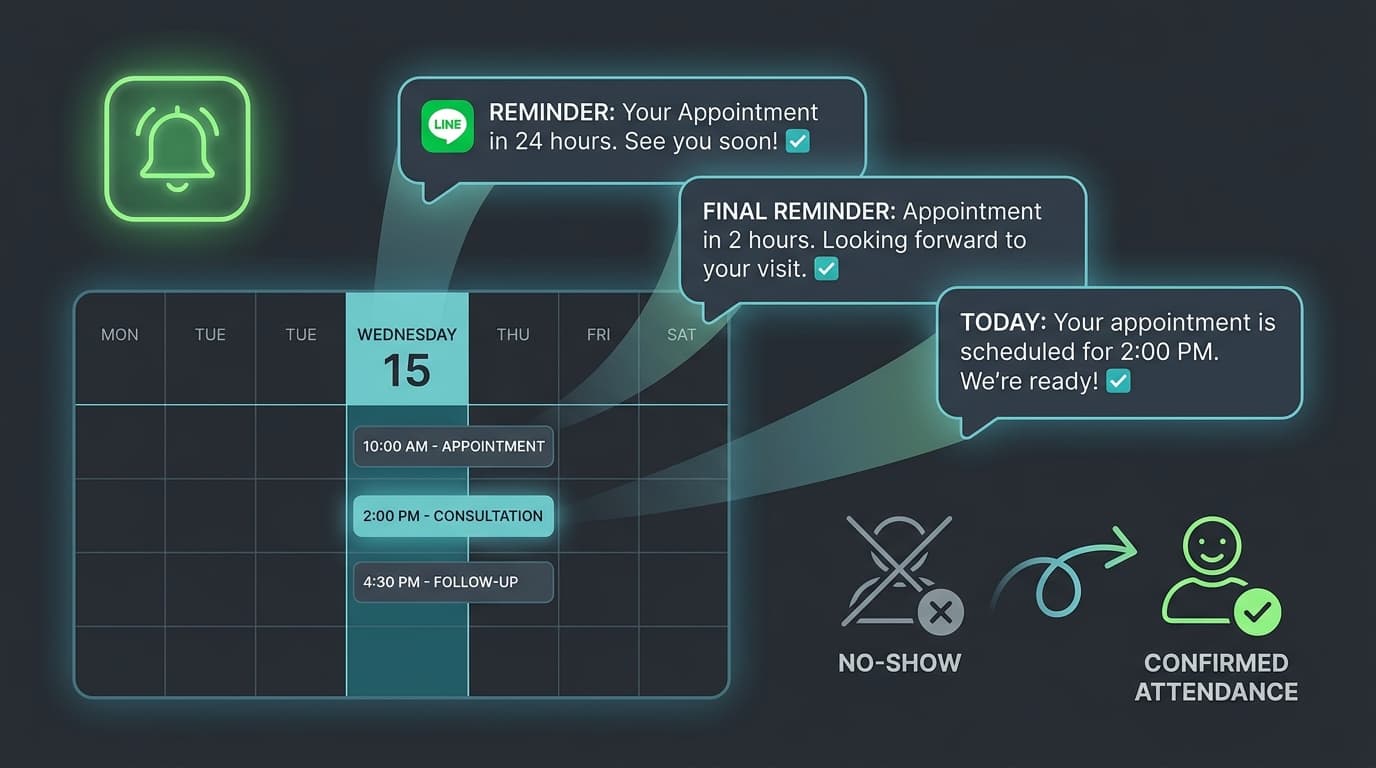
- 3.Schedule messages - sets up delivery for 3 times: immediate confirmation, 24-hour reminder, 2-hour reminder
- 4.Send via LINE - uses LINE Messaging API to send personalized messages with Flex Message buttons for confirm/reschedule
- 5.Update status - records whether customer confirmed, cancelled, or didn't respond
Add Confirm/Cancel buttons to LINE messages using LINE Flex Message - customers can confirm directly in the chat window without needing to call back. Read more: LINE OA Chatbot Guide
Sample Message Templates for Appointment Reminders
High-performance message templates from real-world experience, broken into 3 stages:
| Stage | Timing | Sample Message | Notes |
|---|---|---|---|
| 1. Confirmation | Immediately | Hello [Name] (confirmed) Confirmed: [Service] on [Date] at [Time] with [Staff] at [Location]. Please reply 'Confirm' or 'Reschedule' | All fields personalized |
| 2. 24-hour reminder | Day before at 09:00 | Reminder! [Name], you have a [Service] appointment tomorrow at [Time] at [Location]. To reschedule, please notify us at least 3 hours in advance. | Morning sends have highest open rates |
| 3. 2-hour reminder | 2 hours before | Reminder! [Name]'s appointment starts in 2 hours at [Time]. [Address] [Google Maps Link] | Include Maps link for navigation |
Results: Before and After the Reminder System
Average outcomes for service businesses after installing automated LINE reminders:
| Metric | Before System | After System | Change |
|---|---|---|---|
| No-Show Rate | 20–30% | 5–10% | 60–75% reduction |
| Time calling to confirm | 2–3 hrs/day | 0 hrs/day | 100% reduction |
| Rebooking rate | ~30% | ~55% | 83% increase |
| Monthly revenue lost (20 appt/day clinic) | 120,000 THB lost | 20,000–40,000 THB lost | 65–80% recovered |
| Customer satisfaction | Normal | Higher (feels professional) | Improved |
A good reminder system should send no more than 3 messages per appointment. Sending too many causes customers to block your LINE account - balance between useful and annoying is critical.
Pricing and Timeline for Building the Reminder System
Development costs by package:
- •Basic (Google Calendar + LINE Notify only) - 5,000–9,000 THB, 1 week
- •Standard (+ Flex Message confirm/cancel buttons, dashboard, rebooking link) - 10,000–17,500 THB, 2 weeks
- •Advanced (+ existing booking system integration, CRM, multi-staff scheduling) - 17,500–30,000 THB, 3–4 weeks
CherCode builds LINE appointment reminder systems for service businesses. Request a free quote. Related: LINE Booking System | LINE OA Automation Use Cases | LINE OA Chatbot Guide
Frequently Asked Questions
ระบบแจ้งเตือนนัดหมาย LINE ลด No-Show ได้จริงไหม?
ใช่ จากประสบการณ์จริงลด No-Show Rate ได้ 60–75% โดยเฉลี่ย คลินิกที่มี No-Show 25% เมื่อใช้ระบบ Reminder ลงมาเหลือ 5–10% ผลลัพธ์ขึ้นกับความถี่และคุณภาพข้อความที่ส่ง
ต้องใช้ LINE OA ไหม หรือใช้ LINE ส่วนตัวได้?
ต้องใช้ LINE Official Account (LINE OA) เพื่อใช้ LINE Messaging API สำหรับการส่งข้อความอัตโนมัติ LINE OA สร้างฟรีและมีโควตาข้อความฟรี 500 ข้อความ/เดือน ถ้าต้องการมากกว่าต้องซื้อแพ็กเกจเพิ่ม
ระบบเชื่อมกับ Booking App ที่ใช้อยู่ได้ไหม?
ได้ ถ้า Booking App มี API หรือ Webhook n8n เชื่อมต่อได้โดยตรง รองรับ Google Calendar, Calendly, SimplyBook, Acuity Scheduling และ Booking System ที่สร้างเอง
ลูกค้ากด 'ยกเลิกนัด' ในข้อความ LINE แล้วระบบทำอะไรต่อ?
ระบบรับสัญญาณจาก LINE Webhook อัปเดตสถานะนัดหมายใน Calendar อัตโนมัติ เปิด Slot ว่างให้คนจองใหม่ได้ และส่งข้อความยืนยันการยกเลิกพร้อม Link เพื่อจองนัดใหม่กลับไปให้ลูกค้า

Arm - CherCode
Full-Stack Developer & Founder
Software developer with 5+ years of experience in Web Development, AI Integration, and Automation. Specializing in Next.js, React, n8n, and LLM Integration. Founder of CherCode, building systems for Thai businesses.
Portfolio